Refine the SAC

Reverse Engineering the CoCo Speech/Sound Cartridge Sound Activity Circuit

The Color Computer Speech/Sound Cartridge (S/SC) was one of the more ambitious peripherals Tandy produced for the CoCo line. It packed a TMS-7040 microcontroller, an SPO256-AL2 speech synthesizer, an AY-3-8913 programmable sound generator, and 2K of RAM into a single cartridge. It was complex enough that most CoCo owners never fully understood what it was doing.

I am a contributor to the Mame emulator project, and I maintain the CoCo SSC slot device. It emulates the TMS-7040, the SPO256, and the AY-3-8913 reasonably well. But there is one small piece of the hardware I had never properly emulated: an analog circuit that generates a single status bit indicating whether the PSG is currently producing sound. The bit is active low, lives at address $FF7E bit 5, and I called it the Sound Activity Circuit.

This is the story of how I figured out what it does, measured it on real hardware, and built a proper emulation of it.

The Schematic

The Sound Activity Circuit is a small analog section hanging off the AY-3-8913′s audio output. Looking at the schematic, the signal chain goes like this:

The PSG’s analog output feeds into an op-amp stage (one section of a quad NJM2058D) through a high-pass filter formed by C9 and R6. This strips the DC component and boosts the AC audio signal. The amplified signal then goes into a precision half-wave rectifier built from D2, D1, R1, and R2. This only passes positive half-cycles, and charges a 15µF tantalum capacitor C25 through the rectifier. C25 charges quickly when audio is present, and drains slowly through R9 (56K) when audio stops. Finally, a comparator stage with hysteresis (formed by R3 and R8) watches the voltage on C25 and snaps a clean digital output when C25 crosses the threshold.

In plain terms: the circuit answers the question “is the PSG making sound right now?” with a deliberate time delay on the answer going from yes to no. C25 stays charged for a while after the PSG goes quiet, so brief silences between sounds don’t glitch the status bit.

From the RC values in the schematic, I calculated a charge time constant of about 150ms and a decay time constant of about 840ms. Those were my starting estimates.

The Initial Emulation

In Mame, I implemented this as a stacked audio filter device, cocossc_sac_device, inserted between the AY-3-8913′s output and the speaker. Every time Mame calls sound_stream_update(), the filter sees the PSG’s sample buffer, computes the RMS energy, and stores it in a small circular buffer. The sound_activity_circuit_output() function averages the circular buffer and applies a threshold to decide whether to assert the status bit.

bool cocossc_sac_device::sound_activity_circuit_output()
{
    float sum = std::accumulate(std::begin(m_rms), std::end(m_rms), 0.0f);
    float average = (sum / BUFFER_SIZE);
    return average < 0.317f;
}

This worked, in the sense that it compiled and ran. But the threshold of 0.317 was a magic number with no physical basis, and I had no idea how the decay timing related to real hardware. I was guessing.

I decided to measure the real hardware.

The Plan

The Sound Activity Circuit only responds to PSG output. The SP0256 speech chip bypasses it entirely. So the measurement is straightforward: start the PSG playing a tone, measure how long before the status bit asserts, let C25 fully charge, silence the PSG, then measure how long before the status bit deasserts.

Since I don’t own an oscilloscope (I know, I know), I decided to use the CoCo itself as the measuring instrument. At 0.89MHz, a tight polling loop runs at roughly one iteration per 11 microseconds. More than enough resolution to measure a decay time in the hundreds of milliseconds.

I wrote a small test program in 6809 assembly, wrapped in a C program using CMOC, that would:

  1. Reset the SSC to a known state
  2. Put the SSC into PSG register mode
  3. Program the AY-3-8913 for a 1KHz tone on channel A at maximum volume
  4. Count polling loop iterations until the sound activity bit asserts (charge time)
  5. Wait for C25 to fully charge
  6. Silence the PSG
  7. Count polling loop iterations until the sound activity bit deasserts (decay time)
  8. Print the results

Simple enough in theory. In practice, it took a while to get right.

Pitfall One: The Busy Bit Is Active Low. So Is Everything Else.

The status byte at $FF7E has three active-low bits:

  • Bit 7 ($80) – busy (low = busy)
  • Bit 6 ($40) – speech active (low = speaking)
  • Bit 5 ($20) – sound active (low = PSG making sound)

I initially wrote the busy-wait loop as:

bw1     lda     $ff7e
        bmi     bw1       ; wait while bit 7 set

But since busy is active low, bit 7 being set means not busy. The loop was waiting for the wrong condition. It would spin forever waiting for not-busy while the SSC was idle. The correct test is bpl (branch while plus), meaning while bit 7 is clear (busy):

bw1     lda     $ff7e
        bpl     bw1       ; wait while bit 7 clear = busy

Pitfall Two: The TMS-7040 Needs Time

The SSC uses a TMS-7040 microcontroller as an intermediary between the CoCo and all the other devices in the cartridge. When the CoCo writes a byte to $FF7E, it triggers an interrupt on the TMS-7040, which queues the byte and asserts the busy bit. When in the correct mode, the TMS-7040′s main loop then dequeues the byte and writes it to the PSG, then clears busy.

I assumed that the busy bit clearing meant the TMS-7040 was truly ready for the next byte. It is not. The busy bit clears before the microcontroller is fully ready to accept another write. If you send the next byte too quickly, it gets dropped silently.

The BASIC manual’s example program inadvertently works around this because the BASIC interpreter is slow. The overhead between a POKE and the next GOSUB is enough dead time that the TMS-7040 catches up. In tight assembly code, you have to add explicit delays.

Thru bisection I found that a delay loop of 49 iterations (at 8 cycles each, about 440 microseconds) was the minimum reliable inter-byte delay. I rounded up to 64 for safety. The WRPSG subroutine ended up looking like this:

WR2PSG
        ldx     #64
wp1lp   leax    -1,x
        bne     wp1lp
        pshs    a
bw1     lda     SSCDAT
        bpl     bw1
        puls    a
        sta     SSCDAT
WR1PSG
        ldx     #64
wp2lp   leax    -1,x
        bne     wp2lp
bw2     lda     SSCDAT
        bpl     bw2
        stb     SSCDAT
        rts

Pitfall Three: The Audio Is Not Routed Automatically

The CoCo has a sound multiplexer that selects the audio source for the internal speaker. By default it does not route cartridge audio. Before you can hear anything from the SSC, you need to configure the multiplexer:

*((unsigned char *)0xff01) = 0x34; // PIA 0 CA2 = 0 \_ Set mixer to CART
*((unsigned char *)0xff03) = 0x3f; // PIA 0 CB2 = 1 /
*((unsigned char *)0xff23) = 0x3c; // PIA 1 CB2 = 1 - Turn on sound

The BASIC example programs in the SSC manual does this as a matter of course, but it is easy to miss when writing a standalone C program. Without these writes, the PSG produces output that goes nowhere, and you hear nothing.

The Results

After working through all of those pitfalls, the test program finally ran correctly. The results from multiple runs on real hardware over a ten-minute thermal soak:

  • Charge time: 740 iterations (approximately 8ms). Rock solid across all runs and the entire thermal soak
  • Decay time: 12079-12163 iterations (approximately 133-134ms). Slowly increasing as the board warmed up, with ambient temperature affecting the value measurably. Running a fan near the CoCo during testing dropped the value by roughly 55 counts

The ratio of decay to charge is about 16:1, which is in the right ballpark compared to the schematic’s predicted 6:1. The difference is likely due to component variation in the actual capacitor and resistors on my particular board.

The most interesting finding is that the decay time is 134ms, not the 840ms predicted by the schematic. Either C25 has drifted significantly from its marked value over 40 years, or the board revision I own uses different component values than the schematic I was working from. Either way, real hardware measurements beat schematic theory every time.

The Revised Emulation

Armed with real numbers, I rewrote the Mame emulation. The original RMS circular buffer approach had several problems:

  • The window size had no relationship to the circuit’s actual time constants
  • It was sensitive to Mame’s buffer update rate
  • The AY-3-8913 emulation produces a DC offset at idle which the RMS accumulated, making the circuit appear permanently active
  • The threshold of 0.317 had no physical basis

The analog circuit is fundamentally asymmetric. C25 charges quickly through the rectifier diode but drains slowly through the resistor network. The correct digital model is an envelope follower with asymmetric attack and decay coefficients, preceded by a high-pass filter to remove the DC offset, matching the real circuit’s C9/R6 input filter.

void cocossc_sac_device::sound_stream_update(sound_stream &stream)
{
    int count = stream.samples();

    for (int sampindex = 0; sampindex < count; sampindex++)
    {
        float x = stream.get(0, sampindex);

        // High pass filter to remove DC offset (models C9/R6)
        float y = HPF_ALPHA * (m_hpf_prev_out + x - m_hpf_prev_in);
        m_hpf_prev_in = x;
        m_hpf_prev_out = y;

        // Envelope follower, asymmetric attack/decay (models C25)
        float rect = std::abs(y);
        if (rect > m_envelope)
            m_envelope += (rect - m_envelope) * ATTACK_COEFF;
        else
            m_envelope += (rect - m_envelope) * DECAY_COEFF;

        stream.put(0, sampindex, x);
    }
}

bool cocossc_sac_device::sound_activity_circuit_output()
{
    m_stream->update();

    if (m_sound_active && m_envelope < THRESH_OFF)
        m_sound_active = false;
    else if (m_envelope > THRESH_ON)
        m_sound_active = true;

    return !m_sound_active;  // active low
}

The attack and decay coefficients were derived from the hardware measurements and tuned against the emulated system:

static constexpr float HPF_ALPHA    = 0.99f;
static constexpr float ATTACK_COEFF = 0.0026f;  // models ~8ms charge time
static constexpr float DECAY_COEFF  = 0.0003f;  // models ~134ms decay time
static constexpr float THRESH_ON    = 0.05f;
static constexpr float THRESH_OFF   = 0.01f;

The envelope follower operates sample by sample, so it produces consistent results regardless of Mame’s buffer update rate or the user’s configured sample rate.

Conclusion

I have never encountered any CoCo software that actually polls the sound activity bit during normal operation. This entire exercise was in the service of correctness. If the hardware has the bit, the emulator should get it right.

The process turned out to be more interesting than I expected. What looked like a simple threshold comparison in the schematic revealed a carefully designed asymmetric envelope detector. And the busy-wait protocol had a hidden timing requirement. One that is documented in the manual, but easy to miss when writing tight assembly code.

If I had an oscilloscope, the waveforms on C25 charging and draining would have made a much better illustration for this post. Maybe next time.

The source code for the test program can be found here. The pull request for Mame is here.

ToolShed Tap for Homebrew

I’ve been a Homebrew users for a long time. Very nice experience. My only complaint is using it with old operating systems is not a thing they optimize for.
But with regard to ToolShed, the disk image tool I contribute to, no one has every made a recipe for it.
So I put together a 3rd party tap. Follow instructions there to learn how easy it is to use.
I am choosing not to try to get it mainlined because of how the project includes copyrighted code from others.

SAM/VDG Sizzler

I recently thought it would be nice to have a picture of every video mode a Color Computer could produce. So I wrote a program to make it easy to do that.
Sizzle Screen Shot
You can find this program over on github.
I have also taken the time to make videos of the four major implementations of the CoCo SAM/VDG:

https://archive.org/details/siz-cc-1
https://archive.org/details/siz-cc-2b_202408
https://archive.org/details/siz-cc-3-86
https://archive.org/details/siz-cc-3-87

Demon Attack on a CoCo 3

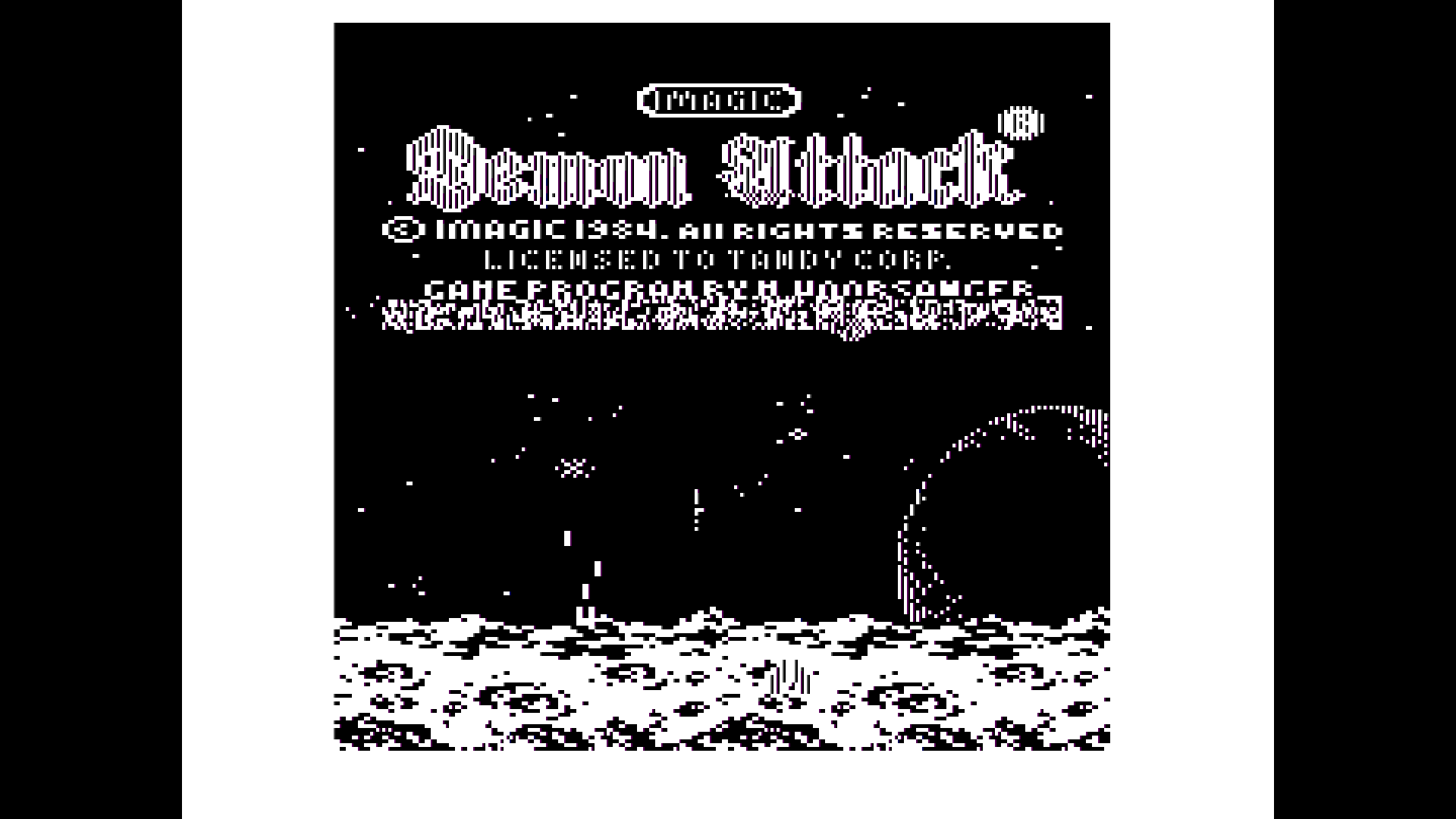
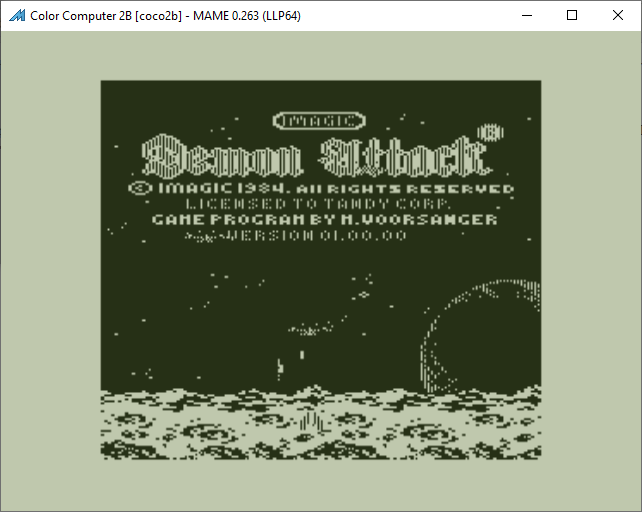
Demon Attack cartridge (26-3099) has a small bug when running on a CoCo 3. The Programmer’s credit and version information is drawn using garbage rather than the correct data from the ROM.

capture1

This has to do with setting bit 3 of $FF90 causing RAM to appear at $FExx. This does not happen on a CoCo 1 or 2.

Capture

CoCo 3 PIA 2 Mirror

The second PIA has a smaller mirror in the CoCo 3 than the CoCo 1/2. It goes from $FF20 to $FF2F. The CoCo 1/2 mirror is from $FF20 to $FF3F.

Recently I was challenged to find a citation for this information. But I could not. Tepolt has this wrong. So I decided to create a test program and accompanying video to document this first hand.

Here is the test program.
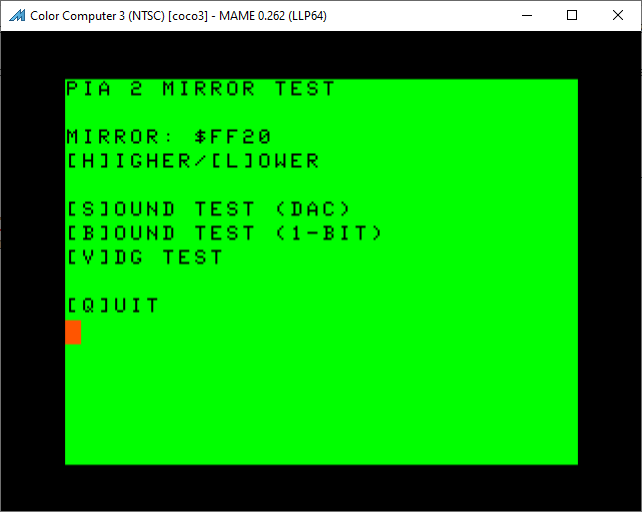
PIA Test Program
It is a menu driven program that allows you to choose a specific mirror address for PIA 2, then allows you to choose one of three tests.

Test ‘S’ produces a square wave using the CoCo’s DAC. This DAC is connect to port A of the PIA.
Test ‘B’ produces a square wave using the CoCo 1 bit sound source. This is connected to bit 1 of port B of the PIA.
Test ‘V’ toggles the A/G line of the VDG. This is connected to bit 7 of port B of the PIA.

When using this program on a CoCo 3 you will find the the second PIA only responds from $FF20 to $FF2F. And the VDG test only responds to $FF20 to $FF23, because the GIME only see writes to these specific addresses.

GIME Horizontal Retrace Register Update Table

This is a proposal to the people who make FPGA versions of the CoCo 3′s GIME chip.

I was recently reading about the Amiga’s Copper chip. I thought something similar could be added to a GIME implementation. The following is my idea, for what it’s worth.

Addresses used:
FF99, Bit 7 Horizontal retrace update enable
FFEA-FFEC Address (24 bit) table start
Table format:
0 byte Scan line
1 byte GIME register number
2 byte New value
Repeating.

Function

If enabled, during the vertical retrace, the 24 bit table start address is loaded. Then the first byte of the table is deference. If the scan line value (table byte 0) is $FF, then the new value is written to the register number. The table pointer is advanced (by three bytes) and writes are repeated until the scan line is no longer $FF. This allows you to set any video registers before they are latched for the frame.

During every Horizontal retrace the scan line declared in the table is compared to the current scan line. If there is a match, the table value is written to the specified GIME register. Then the next table entry scan line is loaded.

If the scan line does not match, the process is paused until then next horizontal retrace.

If there is time, multiple GIME registers can be changed during horizontal retrace.

Register number zero refers to $FF90 (Initialization register #0). It goes up from there.

Register numbers $FE will trigger an FIRQ or IRQ. Nothing will be written to an internal register. Bit 6 will determine which interrupt is generated ($FF92 or $FF93).

Register number $FD will cause the GIME to reload the video start address from $FF9D and $FF9E. Nothing will be written to an internal register.

Example Programs

I implemented the above in a private MAME branch. I wrote some demos and made these screen captures. All this code can be found here.

COLOR64/BAS:

In BASIC, switch to HSCREEN 2 and draw a grid of 64 circles. Eight every row, for 8 rows. Use palette index 1 to 8 for every row. Load in an assembly language program to install a horizontal sync table to update the palette color to show all 64 colors on the screen at the same time.

Color64

JOY/BAS:

In BASIC, switch to HSCREEN 2, then load a binary file. This file contains:
1. Image data to be loaded in the Hi-res screen memory.
2. The first 52 lines are 128 bytes wide
3. The rest are 256 bytes wide.
4. Hsync table to switch to 256 byte wide video at line 52.
5. Code to install hsync table and turn it on.
Then the BASIC program will update the horizontal scroll register in the table to match the horizontal joystick position.

Joy

DUAL/BAS:

In BASIC switch to HSCREEN 2, Draw random circles. Load hsync table and enable it. Near the bottom of the screen the GIME is instructed to switch to text mode and change the display address to be the bottom of the 40 column text screen.
Repeat drawing circle to the graphics screen and printing text to the 40 column screen.

Dual

INT/BAS:

In BASIC load binary from disk, wait for disk to stop spinning. Switch to HSCREEN 2 and have BASIC draw random circles. Setup horizontal table to trigger IRQ interrupt on scan line 100.

Interrupt service routine quickly sets all palette registers to zero. Then immediately restore RGB palette values. Repeat on next frame.

Int

Laurel & Hardy – Commodore 64 Game

I’m not a C64 guy. But I do play their games for a little show I do with my sister. Recently we played this game. https://www.lemon64.com/game/laurel-and-hardy

We usually do a poor job of playing complicated game we don’t know. But both of us decided to really learn this game and try to play it well. The game has a sprawling world and I quickly decided I needed a map. So I made one. I like to share so here it is.

Laurel and Hardy Map.

6809 Exchange and Transfer Opcodes

It was recently brought to my attention that Darren Atkinson has a really good summary of the invalid register exchange and transfer opcodes in the 6809.

So good, that I should use the information to make MAME’s 6809 better match real hardware.

That will be a future post. In the mean time, I wrote a little program to exercise all of the invalid combinations and print results to the CoCo’s screen memory. This way I can, eventually, verify the implementation.

The software package is here: Test-Exg-TFR.zip

Here is a screen shot from a real CoCo 2B with a 6809 running my program:
REAL coco2b

And here is a screen shot form a real CoCo 3 with a 6309 running the same program:
REAL CoCo3h

By “invalid”, I mean the combinations of registers that Motorola didn’t document. Combinations like specifying different width registers when exchanging or transferring. Or the use of the register bit patterns not defined by Motorola.

VDG study (July 2022)

I was recently informed of some inaccuracies with the various VDG text screens emulated in MAME. I also recently acquired an RGB2HDMI. This device is a very configurable retro computer video to HDMI device. One nice feature it has is to write the frame buffer to a PNG file.
Using this device I can capture pixel perfect pictures of my CoCos and compare them to what MAME currently produces.

First, here is the comparison between a real and MAME emulated CoCo 2.

2 and MAME 2 Normal
The stem of the number ’3′ is too short in MAME.
The “E” stem is too short.
The “F” stem is too short.

Next is the CoCo 2B in normal mode.

2B and MAME 2B Normal
Over all the characters need to be pushed one pixel to the right and one pixel up to properly fit in their boxes.
The ‘@’ has an extra pixel.
The ‘G’ is the wrong shape.
The ‘J’ has an extra pixel.
The pound sign has extra pixels.
The dollar sign has extra pixels.
The apostrophe is missing some pixels.
The comma is missing some pixels.
The period is missing some pixels.
The three is missing a pixel on it’s stem.
The ’6′ is the wrong shape.
The ’9′ is the wrong shape.
The colon is missing some pixels.
The semi-colon is missing some pixels.

Next is the CoCo 2B in lowercase mode.

2B and MAME 2B Lowercase
Over all the characters need to be moved one pixel up and to the right. Except the lowercase J. It only needs to be moved one pixel to the right.
The lowercase letter g is the wrong shape.
The lowercase letter m has an extra pixel.
The lowercase letter p is the wrong shape.
The lowercase letter q is the wrong shape.
The lowercase letter t is the wrong shape.
The lowercase letter w is the wrong shape.
The lowercase letter y is the wrong shape.
The pound sign has extra pixels.
The dollar sign has extra pixels.
The apostrophe is missing some pixels.
The comma is missing some pixels.
The period is missing some pixels.
The ’3′ is missing a pixel on it’s stem.
The ’6′ is the wrong shape.
The ’9′ is the wrong shape.
The ‘@’ has an extra pixel.
The colon is missing some pixels.
The semi-colon is missing some pixels.
The ‘G’ is the wrong shape.
The ‘J’ has an extra pixel.

Next is the CoCo 3 in normal mode.

3 and MAME 3 Normal
Over all, the characters need to be moved a pixel up.
The comma also needs to be moved one pixel to the right.
The number 9 has an extra pixel.

Last is the CoCo 3 in lowercase mode.

3 and MAME 3 Lowercase
Over all the characters need to be moved one pixel up.
The lowercase letter g is the wrong shape.
The lowercase letter i is the wrong shape.
The lowercase letter j is the wrong shape.
The lowercase letter m has an extra pixel.
The lowercase letter p is the wrong shape.
The lowercase letter q is the wrong shape.
The comma need to be moved to the right one pixel.
The numeral 9 has an extra pixel.

Special thanks to Pedro Pena for a screen capture.

MAME 0.246 is the first version to contain the fixes for the above.